Work 01 · Deep dive

clipcut — โปรแกรมตัดคลิปพูดภาษาไทยอัตโนมัติ

clipcut — automatic editor for Thai talking clips

เว็บแอปบนเครื่อง · ใช้จากมือถือได้
Local web app · usable from a phone

ลากคลิปพูดที่อัดมาไปวาง แล้ว AI จะถอดเสียง ตัดช่วงเงียบ ใส่ซับไทย เสียงประกอบ GIF และซูมให้ จากนั้นเปิด timeline ให้คนตรวจและแก้ก่อนกดเรนเดอร์ ทั้งหมดทำงานอยู่ในเครื่องของผมเอง

Drop in a recorded talking clip and the AI transcribes it, cuts dead air, adds Thai subtitles, sound effects, GIFs and zooms, then opens a timeline for a person to review and adjust before rendering. Everything runs on my own machine.

How it works

ระบบทำงานยังไง

How it works

01
ลากคลิปวางDrop a clipหน้าแรกของแอป หรือส่งจากมือถือOn the app's home screen, or sent from a phone
02
ถอดเสียงไทยThai transcriptionแยกว่าใครพูด เก็บเวลาทีละคำSpeaker separation, word-level timing
03
AI อ่านบทAI reads the scriptตั้งชื่องาน แก้คำที่ถอดผิด เลือกสไตล์ซับและเพลงNames the job, fixes mis-heard words, picks subtitle style and music
04
ตัดช่วงเงียบCut dead airเก็บช่วงที่กำลังสาธิตไว้ เร่งความเร็วแทนการตัดทิ้งKeeps silent demo moments, speeding them up instead of cutting
05
AI วางเอฟเฟกต์AI places effectsเสียง GIF ซูม และกล้องตามหน้าคนพูด ตามเนื้อหาSounds, GIFs, zooms and a camera that follows the speaker
06
คนตรวจใน editorHuman review in the editorลากแก้บน timeline แล้วเห็นผลทันทีDrag to adjust on the timeline, see it instantly
07
เรนเดอร์Render9:16 สำหรับ Shorts/Reels และ 16:9 สำหรับ YouTube9:16 for Shorts/Reels and 16:9 for YouTube

ขั้นที่มีคนเป็นผู้ตัดสินใจหรือใช้งานSteps where a person decides or uses it

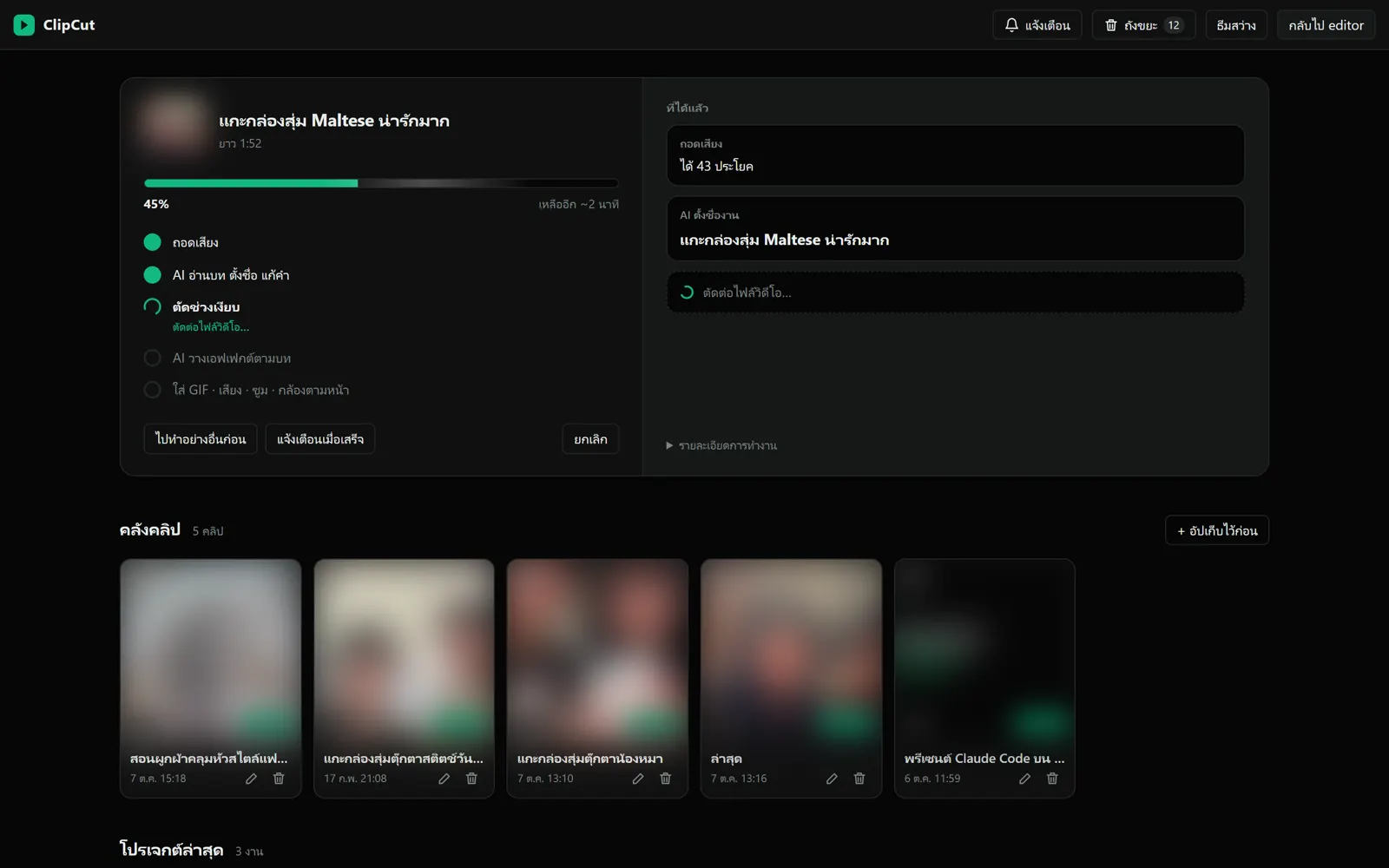
หน้าแรกระหว่าง AI ตัดคลิป: บอกทีละขั้นว่าทำถึงไหน และเหลือเวลาอีกเท่าไหร่ (ภาพคลิปถูกเบลอ)
Home screen while the AI is cutting: each step, and the time left (footage blurred)
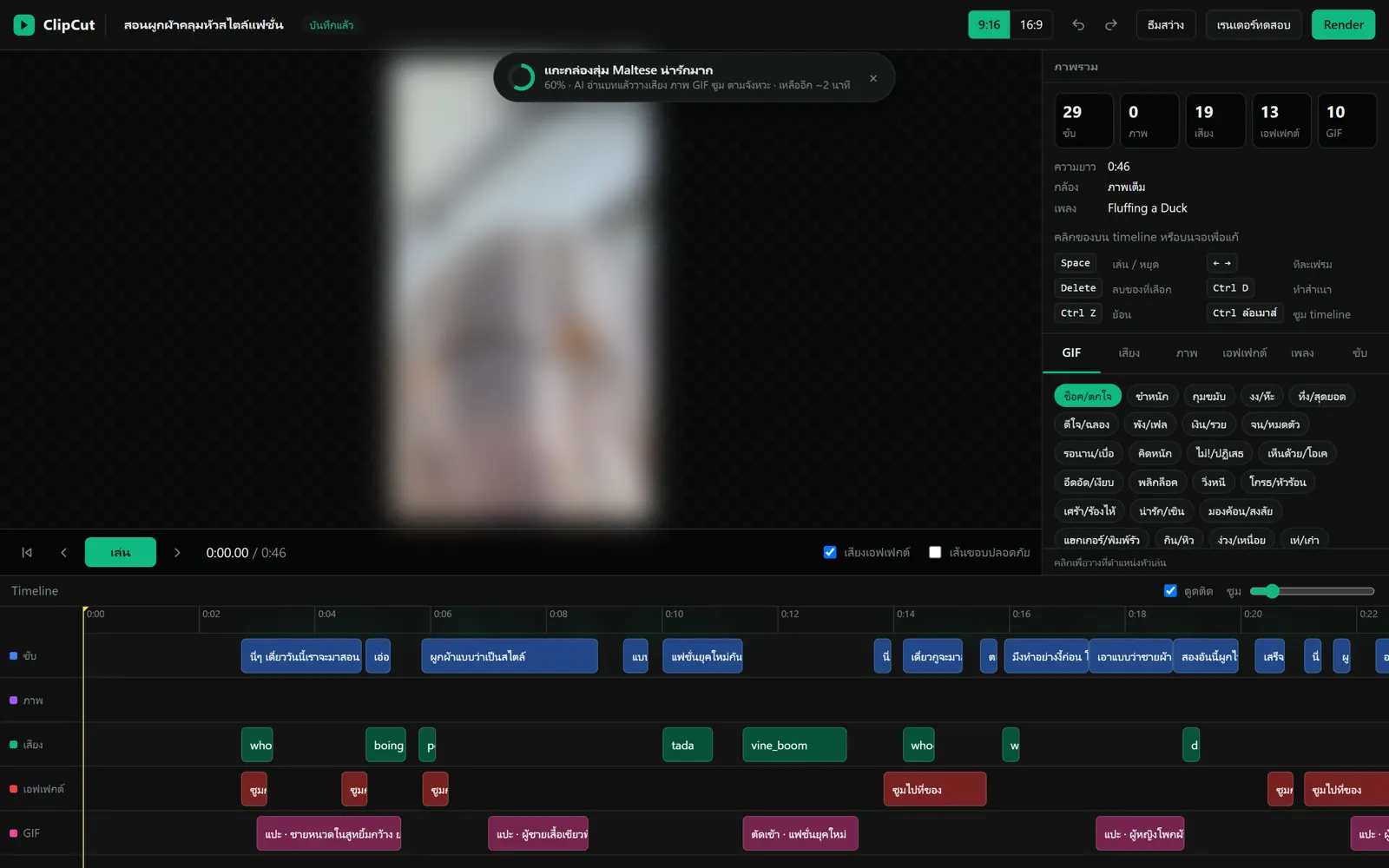
หน้า editor ของโปรเจกต์ทดสอบความยาว 46 วินาที AI วางซับ 29 ท่อน เสียงประกอบ 19 จุด เอฟเฟกต์ 13 จุด และ GIF 10 ตัวไว้ให้ คนแค่ตรวจแล้วแก้ (ภาพคลิปถูกเบลอ)
Editor for a 46-second test project: the AI placed 29 subtitle lines, 19 sound effects, 13 effects and 10 GIFs; the person only reviews (footage blurred)
My calls

ส่วนที่ผมเป็นคนตัดสินใจ

Decisions I made

AI เขียนโค้ดให้ แต่โจทย์ เกณฑ์ และสิ่งที่ยอมไม่ได้ ผมเป็นคนกำหนด

The AI writes the code; the problem, the criteria and the non-negotiables are mine.

AI ร่าง คนตัดสินAI drafts, a human decides

ผมไม่ให้ AI เรนเดอร์ออกไปเองเด็ดขาด ทุกคลิปต้องเปิด editor ให้คนตรวจก่อน เพราะงานแบรนด์โดยเฉพาะสายการเงิน ถ้าคำผิดหรือมุกไม่เหมาะหลุดออกไปครั้งเดียวก็เสียหาย

The AI never renders on its own. Every clip opens in the editor for review first, because in brand work, especially finance, one wrong word or ill-judged joke going out is costly.

ช่วงเงียบไม่ได้แปลว่าไร้ค่าเสมอSilence isn't always worthless

คลิปแกะกล่องหรือสาธิตมักมีช่วงที่ไม่มีใครพูด แต่เป็นช่วงที่คนอยากดูที่สุด ผมเลยสั่งให้ระบบดูการเคลื่อนไหวในภาพก่อน ถ้ามีการสาธิตอยู่ให้เร่งความเร็วแทนการตัดทิ้ง

Unboxing and demo clips often have stretches with no talking that are exactly what viewers want to see. I had the system check for motion first; if something is being shown, it speeds that part up instead of cutting it.

สั่งแก้ด้วยเสียงระหว่างถ่ายSpoken edit requests while filming

พูดไปเลยระหว่างอัด เช่น "ซูมเข้าตรงนี้" หรือ "ใส่รูปกุ้งตรงนี้" แล้ว AI จะจับคำสั่งจากบริบทและทำให้ตรงจุด ไม่ต้องจดไว้ไปแก้ทีหลัง

Just say it while recording ("zoom in here", "put a photo here") and the AI picks up the request from context and applies it at the right moment, no notes needed.

ต้นทุน AI ต่อครั้งต้องต่ำKeep AI cost per call low

ทุกครั้งที่ระบบเรียก AI จะปิดเครื่องมือที่งานนั้นไม่ได้ใช้ ลดจากประมาณ 30,000 token เหลือประมาณ 5,000 token ต่อการเรียกหนึ่งครั้ง และมีบันทึกการใช้ทุกงาน

Every AI call switches off tools the task doesn't need, cutting roughly 30,000 tokens down to about 5,000 per call, and usage is logged for every job.

Code

โค้ดจริงบางส่วน

Real code excerpts

โค้ดทั้งหมดเขียนโดย Claude Code ตามที่ผมสั่ง ผมอ่านแล้วอธิบายได้ว่าแต่ละท่อนทำอะไร และทำไมต้องเขียนแบบนี้ (ข้อมูลลับอย่างรหัสผ่านและที่อยู่เครื่องถูกตัดออก)

All code was written by Claude Code under my direction. I can explain what each part does and why it's written that way. (Secrets such as keys and machine paths are removed; code comments are in Thai.)

ตัดช่วงเงียบ แต่ปากต้องตรงเสียง

Cut the silence, keep lips in sync

รวมช่วงที่มีคนพูดเข้าด้วยกัน ถ้าช่องว่างระหว่างประโยคสั้นกว่าที่ตั้งไว้ก็ไม่ตัด จุดที่สำคัญคือบรรทัดท้าย: ภาพถูกตัดทีละเฟรม แต่เสียงถูกตัดตามเวลาจริง ถ้าไม่ปัดจุดตัดให้ตรงเฟรม ความคลาดจะสะสมทุกรอยตัด จนท้ายคลิปปากไม่ตรงเสียง

Merge the spoken segments; gaps shorter than the threshold are kept. The key is the last line: video is cut frame by frame but audio by exact time, so unless every cut is snapped to a frame the drift adds up and lips fall out of sync by the end.

def compute_keep(segments, pad, min_silence, min_keep=0.25, extra=None):
    """รวม segments ที่พูด (+ ช่วงบังคับเก็บ) → ช่วงที่เก็บไว้ ตัดช่องเงียบที่ยาวกว่า min_silence"""
    spans = []
    for s in segments:
        if not s["text"].strip():
            continue
        spans.append([max(0.0, s["start"] - pad), s["end"] + pad])
    spans += [[a, b] for a, b in (extra or [])]
    spans.sort()
    merged = []
    for st, en in spans:
        if merged and st - merged[-1][1] < min_silence:
            merged[-1][1] = max(merged[-1][1], en)
        else:
            merged.append([st, en])
    # ปัดขอบให้ตรงเฟรม 30fps — ไม่งั้นภาพกับเสียงคลาดสะสมทุกรอยตัด
    snap = lambda t: round(t * FPS) / FPS
    return [(snap(s), snap(e)) for s, e in merged if snap(e) - snap(s) >= min_keep]
scripts/clipcut.pyscripts/clipcut.py · เขียนโดย Claude Codewritten by Claude Code

เรียก AI แบบประหยัด

Calling the AI cheaply

แอปเรียก Claude Code แบบเบื้องหลังให้ช่วยอ่านบทและวางเอฟเฟกต์ แล้วให้ตอบกลับเป็น JSON ที่โปรแกรมเอาไปใช้ต่อได้ทันที ตัวเลือกที่ใส่ไว้คือการปิดเครื่องมือ ปลั๊กอิน และคำสั่งพิเศษที่ไม่จำเป็น ค่าใช้จ่ายเลยลดลงเกือบ 6 เท่า

The app calls Claude Code in the background to read the script and place effects, asking for JSON the program can use directly. The flags switch off tools, plugins and commands it doesn't need, cutting the cost almost sixfold.

def ai(prompt, read=False, model="sonnet", tries=2, turns=6):
    """ถาม claude -p → dict/list (ดึง JSON ก้อนแรกจากคำตอบ)"""
    # ไม่โหลดของที่งานนี้ไม่ใช้ (เครื่องมือ/MCP/skill/settings) — ~30k tokens → ~5k
    cmd = [claude_exe(), "-p", "--output-format", "json", "--model", model,
           "--system-prompt", SYS, "--tools", "Read" if read else "",
           "--strict-mcp-config", "--setting-sources", "project",
           "--disable-slash-commands"]
    ...
    out = json.loads(r.stdout)
    log_usage(out, model)                      # บันทึกค่าใช้จ่ายทุกงาน
    m = re.search(r"[\[{].*[\]}]", out["result"], re.S)
    return json.loads(m.group(0))
scripts/autopilot.pyscripts/autopilot.py · เขียนโดย Claude Codewritten by Claude Code
Problems solved

ปัญหาที่เจอ และวิธีแก้

Problems and fixes

ปัญหาProblem

ซับไทยวรรณยุกต์ซ้อนกัน สระลอยผิดที่

Thai tone marks stacked or floating in the wrong place

แก้ยังไงFix

เปิดโหมดจัดรูปอักษรแบบซับซ้อนของตัวเรนเดอร์ซับ แล้วเลือกฟอนต์ไทยที่รองรับ

Turned on complex text shaping in the subtitle renderer and chose Thai fonts that support it

ปัญหาProblem

ท้ายคลิปปากไม่ตรงเสียง

Lips out of sync near the end

แก้ยังไงFix

ปัดทุกจุดตัดให้ตรงเฟรม (โค้ดด้านบน)

Snap every cut to a frame (code above)

ปัญหาProblem

ถอดเสียงตัดกลางคำ ซับขาดครึ่ง

Transcription split words mid-way, breaking subtitles

แก้ยังไงFix

รวมท่อนที่ถูกตัดกลางคำกลับเข้าด้วยกันก่อนทำซับ

Re-join segments split mid-word before building subtitles

ปัญหาProblem

อยากใช้นอกบ้าน

Wanted to use it away from home

แก้ยังไงFix

เปิดให้มือถือของตัวเองเข้าได้ผ่านเครือข่ายส่วนตัว (VPN) มี PIN ล็อก และมีหน้า editor ขนาดมือถือแยก

Phone access over a private network (VPN) behind a PIN, with a separate phone-sized editor

animclipanimclip →