Work 04 · Deep dive

แบ่งกลุ่มลูกค้าตามพฤติกรรมการซื้อ

Behavior-based customer segmentation

งานวิเคราะห์ข้อมูล · ผลถูกเขียนกลับเข้า ERP และขึ้นแดชบอร์ด
Data analysis · results written back to the ERP and shown on the dashboard

ลูกค้า 1,074 รายของธุรกิจครอบครัวถูกติดป้ายประเภทด้วยมือ โดยดูจากชื่อร้าน งานนี้เปลี่ยนมาใช้ประวัติการซื้อจริงเป็นตัวตัดสิน ทั้งเพื่อแก้ป้ายที่ผิด และเพื่อหาลูกค้าประจำที่กำลังหายไป

The family business's 1,074 customers had been labelled by hand from their shop names. This work switched to real purchase history as the judge, both to fix wrong labels and to find regulars who are drifting away.

How it works

ระบบทำงานยังไง

How it works

01
ประวัติการซื้อPurchase historyทุกบิล ทุกรายการ ตัดบิลยกเลิกและรายการคืนของEvery invoice and line, excluding cancellations and returns
02
วัดพฤติกรรมMeasure behaviorความถี่บิล ขนาดออเดอร์ ความหลากหลาย เพดานจำนวนต่อรายการInvoice frequency, order size, variety, max quantity per line
03
ตั้งเกณฑ์จากกลุ่มจริงSet thresholds from real groupsดูหน้าตาของลูกค้าที่ป้ายถูกแน่ๆ ก่อนProfile customers whose label is certainly right first
04
คัดรายที่ผิดFlag the mislabelledตรวจทีละรายก่อนแก้Check each one before changing it
05
เขียนกลับ ERPWrite back to the ERPสำรองข้อมูลก่อนทุกครั้งAlways back up first
06
มุมมองบนแดชบอร์ดViews on the dashboardAt Risk · Loyalty · ลูกค้าใหม่ · หายไปแล้วAt Risk · Loyalty · New · Lapsed

ขั้นที่มีคนเป็นผู้ตัดสินใจหรือใช้งานSteps where a person decides or uses it
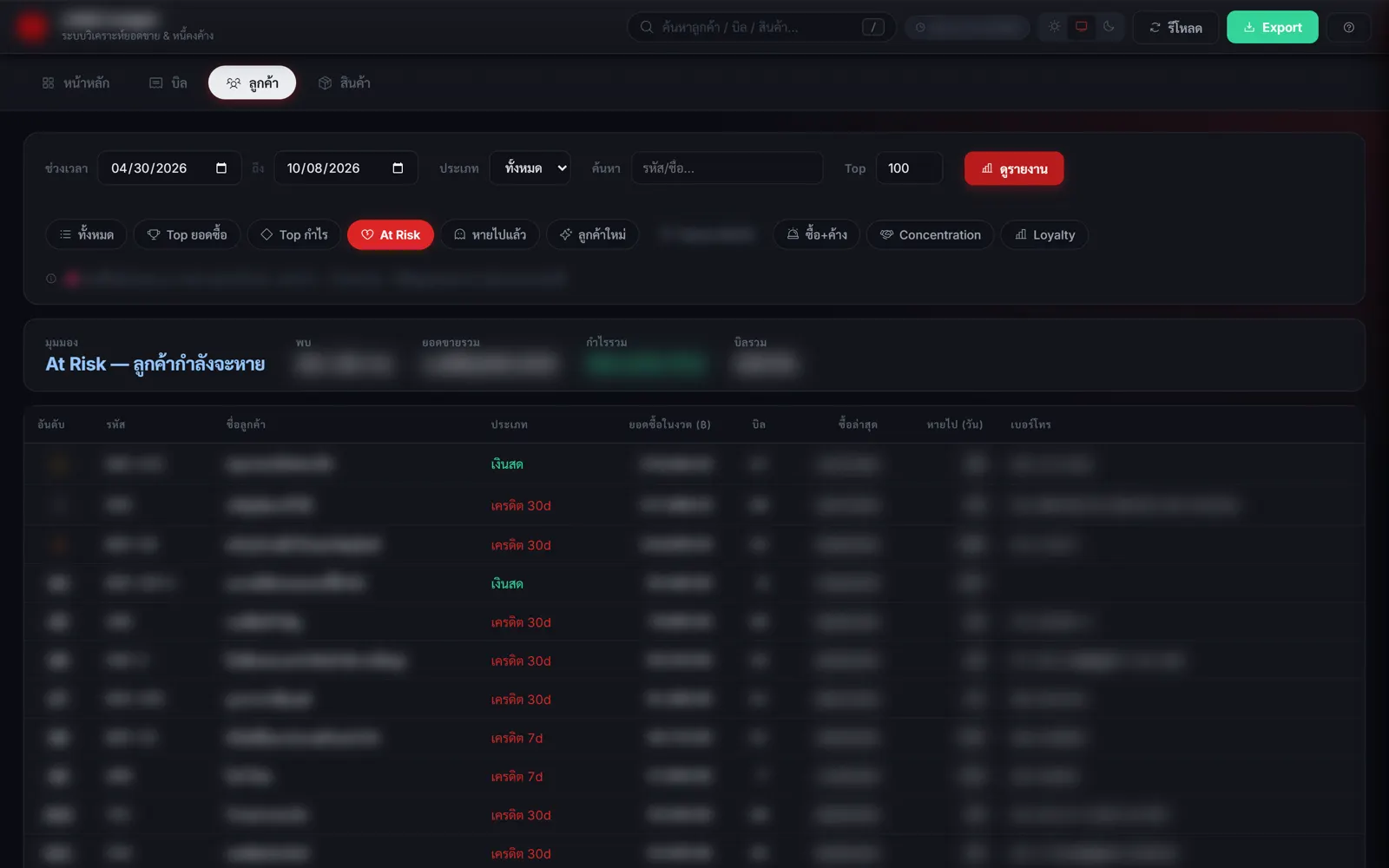
มุมมอง At Risk: เคยซื้อสม่ำเสมอแต่หายไป 60–180 วัน เรียงตามยอดซื้อ มีเบอร์ให้โทรตามได้ (ชื่อ ตัวเลข และเบอร์ถูกเบลอ)
At Risk view: bought regularly but silent for 60–180 days, sorted by purchases, with phone numbers to follow up (names, figures and numbers blurred)

กรอบการแบ่ง 4 กลุ่มจากพฤติกรรม

Four segments defined by behavior

กลุ่มสัญญาณหลักบิล/ปีความหลากหลายสินค้า
ยี่ปั๊ว / ดีลเลอร์ซื้อถี่ + หลากหลายมาก100+สูง
ร้านค้าหน้าร้านถี่ปานกลาง + เพดานจำนวนต่ำ10–80กลาง
โครงการซื้อน้อยครั้ง แต่ออเดอร์ใหญ่1–20ต่ำ
นายหน้าไม่สม่ำเสมอ ออเดอร์เล็ก5–50หลากหลาย
SegmentMain signalInvoices/yrProduct variety
Wholesaler / dealerVery frequent + very varied100+High
Retail shopMedium frequency + low quantity ceiling10–80Medium
ProjectRare but large orders1–20Low
BrokerIrregular, small orders5–50Varied

ชื่อร้านใช้เป็นตัวตัดสินไม่ได้ ใช้พฤติกรรมการซื้อเป็นหลัก

Shop names can't be trusted; behavior is the primary signal

My calls

ส่วนที่ผมเป็นคนตัดสินใจ

Decisions I made

AI เขียนโค้ดให้ แต่โจทย์ เกณฑ์ และสิ่งที่ยอมไม่ได้ ผมเป็นคนกำหนด

The AI writes the code; the problem, the criteria and the non-negotiables are mine.

ค่าเฉลี่ยหลอกตาAverages lie

ตอนแรกจะแยกร้านหน้าร้านกับร้านขายส่งด้วยจำนวนชิ้นเฉลี่ยต่อรายการ แต่ปรากฏว่าค่ากลางของสองกลุ่มแทบเท่ากัน (17.6 กับ 18.6 ชิ้น) ตัวที่แยกได้จริงคือเพดาน เพราะร้านหน้าร้านไม่เคยสั่งเกินระดับหนึ่ง ส่วนร้านขายส่งมีบางบิลที่สั่งหลายร้อยชิ้น

I first tried to separate retail shops from wholesalers by average units per line, but the two groups' medians were almost identical (17.6 vs 18.6). What actually separated them was the ceiling: retail shops never order above a certain level, while wholesalers have some invoices with hundreds of units.

ตั้งเกณฑ์จากข้อมูล ไม่ใช่จากความรู้สึกThresholds from data, not gut feel

ก่อนตั้งตัวเลข ผมให้คำนวณหน้าตาของลูกค้ากลุ่มเป้าหมายที่ป้ายถูกแน่ๆ ก่อน แล้วค่อยตั้งเกณฑ์จากตรงนั้น

Before setting any number, I had the profile of the target group calculated from customers whose label was certainly correct, and set thresholds from that.

ข้อมูลน้อยไป อย่าเพิ่งตัดสินToo little data, no verdict

ลูกค้าที่ซื้อไม่ถึง 3 บิลจะไม่ถูกเปลี่ยนป้าย เพราะอาจแค่บังเอิญซื้อน้อยในครั้งนั้น และบัญชีรวมของลูกค้าเงินสดหน้าร้านจะไม่ถูกแตะ

Customers with fewer than 3 invoices are never relabelled, since a small order may be a one-off. The pooled walk-in cash account is never touched.

Code

โค้ดจริงบางส่วน

Real code excerpts

โค้ดทั้งหมดเขียนโดย Claude Code ตามที่ผมสั่ง ผมอ่านแล้วอธิบายได้ว่าแต่ละท่อนทำอะไร และทำไมต้องเขียนแบบนี้ (ข้อมูลลับอย่างรหัสผ่านและที่อยู่เครื่องถูกตัดออก)

All code was written by Claude Code under my direction. I can explain what each part does and why it's written that way. (Secrets such as keys and machine paths are removed; code comments are in Thai.)

คัดลูกค้าที่ติดป้ายผิด

Flagging mislabelled customers

เกณฑ์ที่ใช้จริง (ย่อจากงานวิเคราะห์): ถ้าเพดานจำนวนต่อรายการไม่เกิน 12 ชิ้น และซื้อมาแล้วอย่างน้อย 3 บิล แปลว่าซื้อแบบหน้าร้านเป็นนิสัย ไม่ใช่ซื้อน้อยแค่ครั้งเดียว รอบแรกเจอ 6 ราย ทุกรายมีมูลค่าต่อบิลอยู่ในช่วงของหน้าร้านจริง

The rule actually used (condensed from the analysis): a per-line ceiling of 12 units or fewer AND at least 3 invoices means buying like a retail shop is a habit, not a one-off. The first pass found 6, all with invoice values in the true retail range.

# per customer: เพดานชิ้นต่อรายการ + จำนวนบิล + มูลค่าเฉลี่ยต่อบิล
for cus, lines in sales_by_customer.items():
    bills = {l.doc for l in lines}
    max_qty = max(l.qty for l in lines)
    if cus in VOID_DOCS or cus == CASH_BUCKET:      # บิลยกเลิก / บัญชีรวมเงินสด
        continue
    if max_qty <= 12 and len(bills) >= 3:           # เพดานต่ำ + ซื้อซ้ำ = นิสัยหน้าร้าน
        candidates.append((cus, max_qty, len(bills), avg_bill_value(lines)))
วิเคราะห์ประวัติการขาย (ย่อ)sales history analysis (condensed) · เขียนโดย Claude Codewritten by Claude Code

มุมมองตามวงจรชีวิตลูกค้า

Lifecycle views

ทุกมุมมองบนแดชบอร์ดเป็นแค่ตัวกรองสั้นๆ บนข้อมูลชุดเดียวกัน จะเพิ่มกลุ่มใหม่ก็แค่เพิ่มเงื่อนไข

Each dashboard view is just a short filter over the same data; adding a segment means adding a condition.

case 'atrisk':   // เคยซื้อสม่ำเสมอ แต่หายไป 60–180 วัน
  result = customers.filter(c => c.bills >= 3 && c.daysSince >= 60 && c.daysSince < 180)
                    .sort((a, b) => b.saleVal - a.saleVal);
  break;
case 'dormant':  // หายไปเกิน 180 วัน
  result = customers.filter(c => c.daysSince >= 180 && c.saleVal > 0);
  break;
case 'newcus':   // ซื้อครั้งแรกภายใน 90 วัน
  result = customers.filter(c => c.daysFirst <= 90 && c.saleVal > 0);
  break;
server.jsserver.js · เขียนโดย Claude Codewritten by Claude Code
Problems solved

ปัญหาที่เจอ และวิธีแก้

Problems and fixes

ปัญหาProblem

จำนวนชิ้นในระบบมีสองช่อง

The system has two quantity fields

แก้ยังไงFix

ใช้ช่องที่เป็นจำนวนชิ้นจริง ไม่ใช่ช่องหน่วยขาย

Use the one that is the real unit count, not the selling-unit field

ปัญหาProblem

บิลยกเลิกไม่ได้อยู่ในตารางรายการขาย

Cancelled invoices weren't in the sales-line table

แก้ยังไงFix

ดึงรายชื่อบิลยกเลิกจากอีกตารางมาตัดออกก่อน

Pull the list of cancelled invoices from another table and exclude them first

ปัญหาProblem

แก้ข้อมูลใน ERP มีความเสี่ยง

Editing ERP data is risky

แก้ยังไงFix

ปิดโปรแกรมบัญชี สำรองข้อมูล แก้ แล้วสั่งจัดเรียงดัชนีใหม่ทุกครั้ง

Close the accounting software, back up, edit, then rebuild the indexes every time

← แดชบอร์ดยอดขายและลูกค้าSales & customer dashboardเว็บแคตตาล็อกสินค้าสำหรับลูกค้า B2BB2B product catalog website →