Work
ผลงาน 6 ชิ้น
6 projects
แต่ละชิ้นเล่า 4 ท่อน: ปัญหา → สร้างอะไร → ผล → ทีมการตลาดเอาไปใช้ยังไง และมีหน้าเจาะลึกที่อธิบายว่าระบบทำงานยังไง พร้อมโค้ดจริง ตัวเลขยอดขาย ข้อมูลลูกค้า และผลการเทรดในภาพถูกเบลอไว้ทั้งหมด
Each one in four parts: problem → what I built → result → how a marketing team would use it, plus a deep-dive page with the system flow and real code. Sales figures, customer data and trading results in screenshots are blurred.
01
clipcut — โปรแกรมตัดคลิปพูดภาษาไทยอัตโนมัติ
clipcut — automatic editor for Thai talking clips
เว็บแอปบนเครื่อง: ลากคลิปพูดวาง AI ตัดและใส่เอฟเฟกต์ให้ คนตรวจแล้วค่อยเรนเดอร์
A local web app: drop in a talking clip, AI cuts it and adds effects, a person reviews before rendering
ปัญหาProblem
คลิปสั้นต้องออกถี่ แต่งานตัดช่วงเงียบ ใส่ซับไทย ใส่เพลงและเอฟเฟกต์ กินเวลาคนตัดต่อทั้งวัน ทีมเล็กปล่อยคลิปไม่ทันรอบข่าวหรือรอบแคมเปญ
Short video has to ship often, but cutting dead air, adding Thai subtitles, music and effects eats an editor's whole day. Small teams miss the news cycle and campaign windows.
สร้างอะไรWhat I built
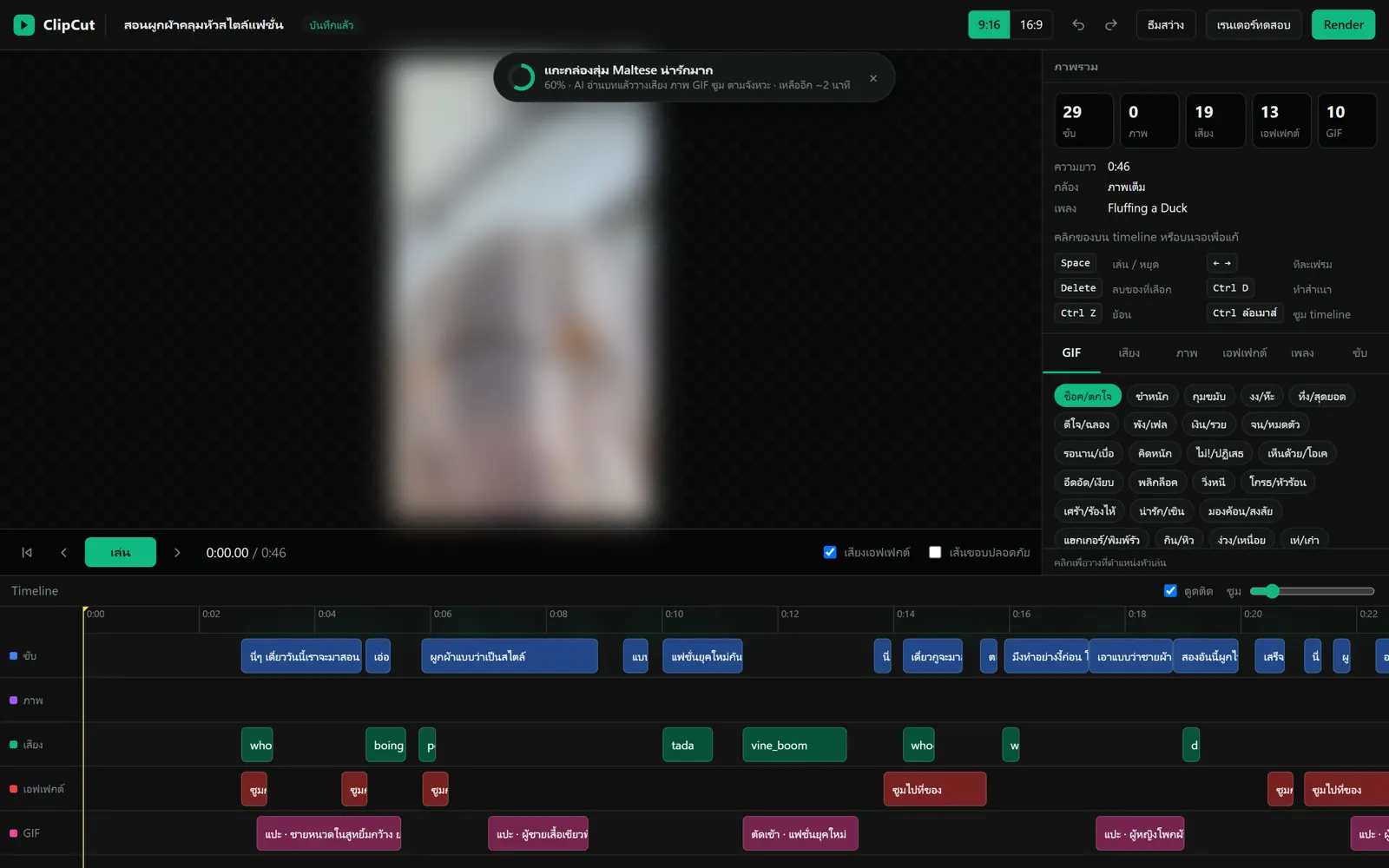
ลากคลิปพูดไปวางในแอป ระบบถอดเสียงไทย ตัดช่วงเงียบ (แต่เก็บช่วงที่กำลังสาธิตไว้) ใส่ซับไทยสไตล์คลิปไวรัล เสียงประกอบ GIF และซูมตามเนื้อหา แล้วเปิด timeline ให้คนตรวจแก้ก่อนเรนเดอร์ 9:16 และ 16:9 ใช้จากมือถือได้ และสั่งแก้ด้วยเสียงระหว่างถ่ายได้
Drop a talking clip into the app: it transcribes the Thai audio, cuts dead air (keeping silent demo moments), adds viral-style Thai subtitles, sound effects, GIFs and zooms based on what is said, then opens a timeline for a person to review before rendering 9:16 and 16:9. Works from a phone, and accepts spoken edit requests made while filming.
ผล (ตามจริง)Result (honestly)
ใช้งานได้ครบทั้งวงจรแล้ว แต่ยังไม่ได้เอาไปลงช่องจริง จึงยังไม่มียอดวิว ตัวอย่างจากโปรเจกต์ทดสอบความยาว 46 วินาที: AI วางซับ 29 ท่อน เสียงประกอบ 19 จุด เอฟเฟกต์ 13 จุด และ GIF 10 ตัวไว้ให้ คนเหลือหน้าที่แค่ตรวจแล้วแก้
Works end to end, but not yet used on a live channel, so there are no view numbers. On one 46-second test project the AI placed 29 subtitle lines, 19 sound effects, 13 effects and 10 GIFs; the person only reviews and adjusts.
ทีมการตลาดเอาไปใช้ยังไงHow a marketing team would use it
ตัดคลิปไลฟ์ สัมภาษณ์ หรืออีเวนต์ยาวๆ ออกเป็นคลิปสั้นหลายชิ้นได้ภายในวันเดียว และทุกคลิปผ่านคนตรวจก่อนปล่อย จึงคุมถ้อยคำให้ตรงเกณฑ์โฆษณาของ ก.ล.ต. ได้
Turn long livestreams, interviews or event footage into many short clips the same day. Every clip is reviewed before release, so wording stays within Thai SEC advertising rules.
02
animclip — หัวข้อเดียว กลายเป็นคลิปแอนิเมชัน
animclip — one topic in, an animated short out
สกิลของ Claude Code: ไม่ต้องมีกล้อง ไม่ต้องมีคนออกหน้ากล้อง
A Claude Code skill: no camera, no one on screen
ปัญหาProblem
คอนเทนต์ให้ความรู้ต้องออกสม่ำเสมอ แต่ไม่ใช่ทุกเรื่องที่มีคนพร้อมออกหน้ากล้อง ส่วนการจ้างทำแอนิเมชันก็แพงและใช้เวลานาน
Educational content has to ship consistently, but not every topic has someone ready to be on camera, and commissioned animation is slow and expensive.
สร้างอะไรWhat I built
พิมพ์คำสั่งพร้อมหัวข้อใน Claude Code แล้ว AI จะเขียนบท (มี hook ใน 2 วินาทีแรก และเว้นจังหวะก่อนตบมุก) ส่งบทให้คนรีวิว จากนั้นจัดซีนแอนิเมชันพิกเซลผสมกระดาษปะติด พากย์เสียงไทย ตัดซีนให้ลงจังหวะเพลง ใส่เสียงประกอบตรงคำ แล้วเรนเดอร์เป็นคลิปแนวตั้ง ตอนนี้ยังเป็นคำสั่งในแชท ยังไม่มีหน้าแอป
Type one command with a topic in Claude Code: the AI writes a script (a hook in the first 2 seconds, a pause before each punchline), sends it for human review, then builds pixel-art and paper-collage scenes, Thai voice-over, cuts on the music beat, adds sound effects on cue and renders a vertical video. It runs as a chat command today; there is no app screen yet.
ผล (ตามจริง)Result (honestly)
เรนเดอร์คลิปทดสอบได้แล้วหลายเรื่อง แต่ละคลิปยาว 30–80 วินาทีจากหัวข้อเดียว ยังไม่ได้เอาไปลงช่องจริง จึงยังไม่มียอดวิว
Several test videos rendered, each 30–80 seconds from a single topic. Not yet used on a live channel, so there are no view numbers.
ทีมการตลาดเอาไปใช้ยังไงHow a marketing team would use it
ทำคลิปอธิบายฟีเจอร์ คลิปสอนเปิดบัญชีหรือยืนยันตัวตน และคลิปความรู้เรื่องความเสี่ยงได้ทุกวัน ใช้ตัวละครเดิมจนเป็นภาษาภาพของแบรนด์ และแก้บทได้โดยไม่ต้องเปิดโปรแกรมตัดต่อ
Daily feature explainers, account-opening and KYC how-tos, and risk-education clips, with recurring characters that become part of the brand, and scripts editable without opening an editing tool.
03
แดชบอร์ดยอดขายและลูกค้า
Sales & customer dashboard
ระบบวิเคราะห์ที่ใช้จริงทุกวันในธุรกิจครอบครัว (นำเข้าและจำหน่ายสุขภัณฑ์)
An analytics app used daily in my family's business (sanitary-ware import and distribution)
ปัญหาProblem
ข้อมูลขายทั้งหมดอยู่ในโปรแกรมบัญชี (ERP) ที่เปิดดูยาก อยากรู้อะไรต้อง export ไปทำ Excel เองทุกครั้ง เลยไม่มีใครรู้ทันว่าเดือนนี้ยอดเป็นยังไง ลูกค้ารายไหนเงียบไป หรือใครค้างจ่ายเกินกำหนด
All sales data lived in accounting software (ERP) that is hard to read. Every question meant exporting to Excel, so nobody knew in time how the month was going, which customers had gone quiet, or who was overdue.
สร้างอะไรWhat I built
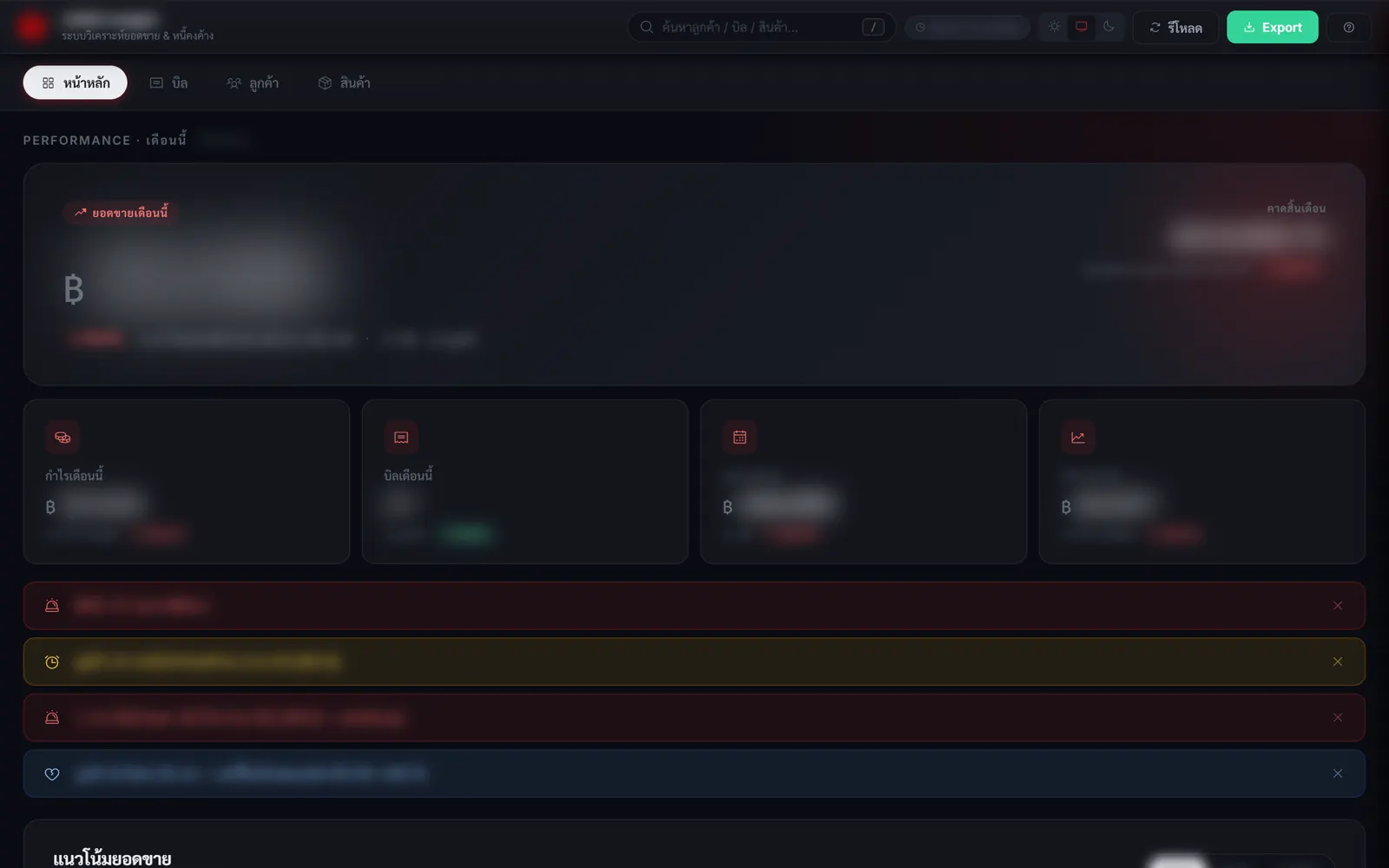
เว็บแอปภายในที่ดึงข้อมูลจาก ERP โดยตรง หน้าแรกตอบคำถามสำคัญได้ในทีเดียว: ยอดขายเดือนนี้เทียบช่วงเดียวกันเดือนก่อน คาดการณ์สิ้นเดือน กำไรและ margin และแถบแจ้งเตือน (สินค้าที่ต้องสั่งด่วน ลูกค้าเกินกำหนดชำระ ลูกค้าเสี่ยงหาย) ค้นหาลูกค้า บิล และสินค้าได้จากช่องเดียว export ได้ และเปิดจากนอกออฟฟิศได้
An internal web app that reads the ERP directly. The home screen answers the key questions at a glance: month-to-date sales vs. the same period last month, a month-end forecast, profit and margin, and alerts (stock to reorder, overdue customers, customers at risk). One search box for customers, invoices and products, export, and remote access.
ผลResult
ใช้งานจริงทุกวัน ไม่ต้อง export Excel มาทำรายงานเองอีก เห็นปัญหาจากแถบแจ้งเตือนทันทีโดยไม่ต้องไปขุดหา (ตัวเลขธุรกิจไม่เปิดเผย)
Used every day; no more manual Excel reports, and problems surface in the alert bar instead of being dug up. (Business figures are not disclosed.)
ทีมการตลาดเอาไปใช้ยังไงHow a marketing team would use it
ทำแดชบอร์ด funnel ของแคมเปญเองได้ (สมัคร → ยืนยันตัวตน → ฝากเงิน → ทำรายการครั้งแรก) ตั้งแจ้งเตือนเวลาตัวเลขหลุดเป้า ทีมไม่ต้องรอคิวทีม data ทุกครั้งที่อยากรู้ผลแคมเปญ
Build campaign funnel dashboards in-house (sign-up → KYC → deposit → first transaction) with alerts when a number drops, without queuing for the data team every time.
04
แบ่งกลุ่มลูกค้าตามพฤติกรรมการซื้อ
Behavior-based customer segmentation
เลิกเดาประเภทลูกค้าจากชื่อร้าน ใช้ประวัติการซื้อจริงแทน
Stop guessing customer type from shop names; use real purchase history
ปัญหาProblem
ลูกค้ากว่าพันรายถูกติดป้ายประเภท (ขายส่ง หน้าร้าน โครงการ) ด้วยมือ โดยดูจากชื่อร้าน พอติดป้ายผิด การตั้งราคาและการดูแลก็ผิดกลุ่มตามไปด้วย ที่หนักกว่านั้นคือไม่มีใครรู้ว่าลูกค้าประจำคนไหนกำลังหายไป
Over a thousand customers were labelled by hand (wholesale, retail shop, project) based on their shop name. Wrong labels meant wrong pricing and wrong treatment, and nobody could see which regulars were drifting away.
สร้างอะไรWhat I built
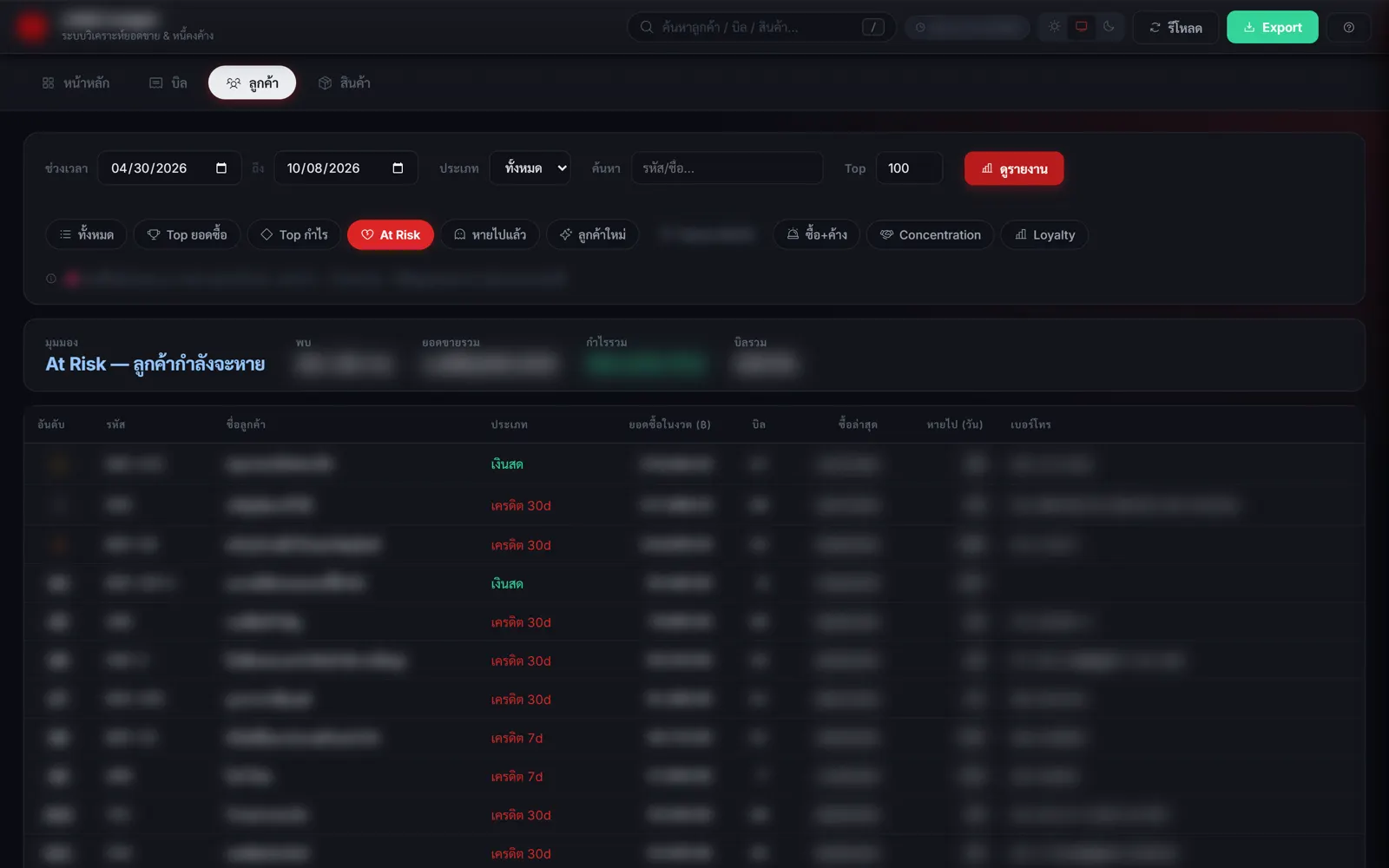
แบ่งกลุ่มลูกค้าจากพฤติกรรมจริง ได้แก่ ความถี่ของบิล ขนาดออเดอร์ ความหลากหลายของสินค้า และจำนวนสูงสุดที่เคยซื้อต่อรายการ แล้วทำเป็นมุมมองพร้อมใช้: At Risk (เคยซื้อสม่ำเสมอแต่หายไป 60–180 วัน), Loyalty, ลูกค้าใหม่ และลูกค้าที่หายไปแล้ว แต่ละรายมีเบอร์โทรให้ตามต่อได้ทันที รายที่ติดป้ายผิดถูกคัดออกมาแก้กลับเข้า ERP
Segments built from actual behavior: invoice frequency, order size, product variety and the largest quantity ever bought per line. Ready-made views: At Risk (bought regularly, silent for 60–180 days), Loyalty, new and lapsed customers, each with a phone number to follow up. Mislabelled customers were flagged and corrected in the ERP.
ผลResult
ใช้กับฐานลูกค้าทั้งหมด 1,074 ราย รอบแรกเจอลูกค้าที่ติดประเภทผิด 6 ราย และแก้ในระบบแล้ว สิ่งที่ได้เรียนรู้คือค่าเฉลี่ยแยกกลุ่มไม่ออก เพราะโปรไฟล์ของสองกลุ่มทับกัน ตัวที่แยกได้จริงคือเพดานจำนวนต่อรายการบวกกับความถี่ของบิล
Applied to the full base of 1,074 customers; the first pass found 6 mislabelled customers, now corrected. Lesson: averages could not separate the groups because their profiles overlap; the per-line quantity ceiling plus invoice frequency did.
ทีมการตลาดเอาไปใช้ยังไงHow a marketing team would use it
แบ่งผู้ใช้ exchange ตามพฤติกรรม เช่น สมัครแล้วแต่ไม่ยืนยันตัวตน ยืนยันแล้วแต่ไม่ฝาก หรือเคยใช้ประจำแต่หายไป แล้วส่งข้อความหรือแคมเปญที่เหมาะกับแต่ละกลุ่ม (CRM / win-back) แทนการยิงข้อความเดียวกันให้ทุกคน
Segment exchange users by behavior (signed up but no KYC, verified but no deposit, regulars who went quiet) and send each group its own message or campaign (CRM / win-back) instead of one blast to everyone.
05
เว็บแคตตาล็อกสินค้าสำหรับลูกค้า B2B
B2B product catalog website
ราคาและสต็อกจริง อัปเดตเองจาก ERP ลูกค้าไม่ต้องทักมาถามทีละรายการ
Real prices and stock, synced from the ERP, so customers stop asking item by item
ปัญหาProblem
ร้านค้าและผู้รับเหมาทักไลน์มาถามราคาและสต็อกทีละรายการ พนักงานต้องเปิดระบบแล้วตอบคำถามเดิมซ้ำทุกวัน ส่วนลูกค้าก็ไม่รู้ว่าร้านมีสินค้าอะไรบ้าง
Shops and contractors messaged on LINE about price and stock one item at a time. Staff answered the same questions every day, and customers had no view of the full range.
สร้างอะไรWhat I built
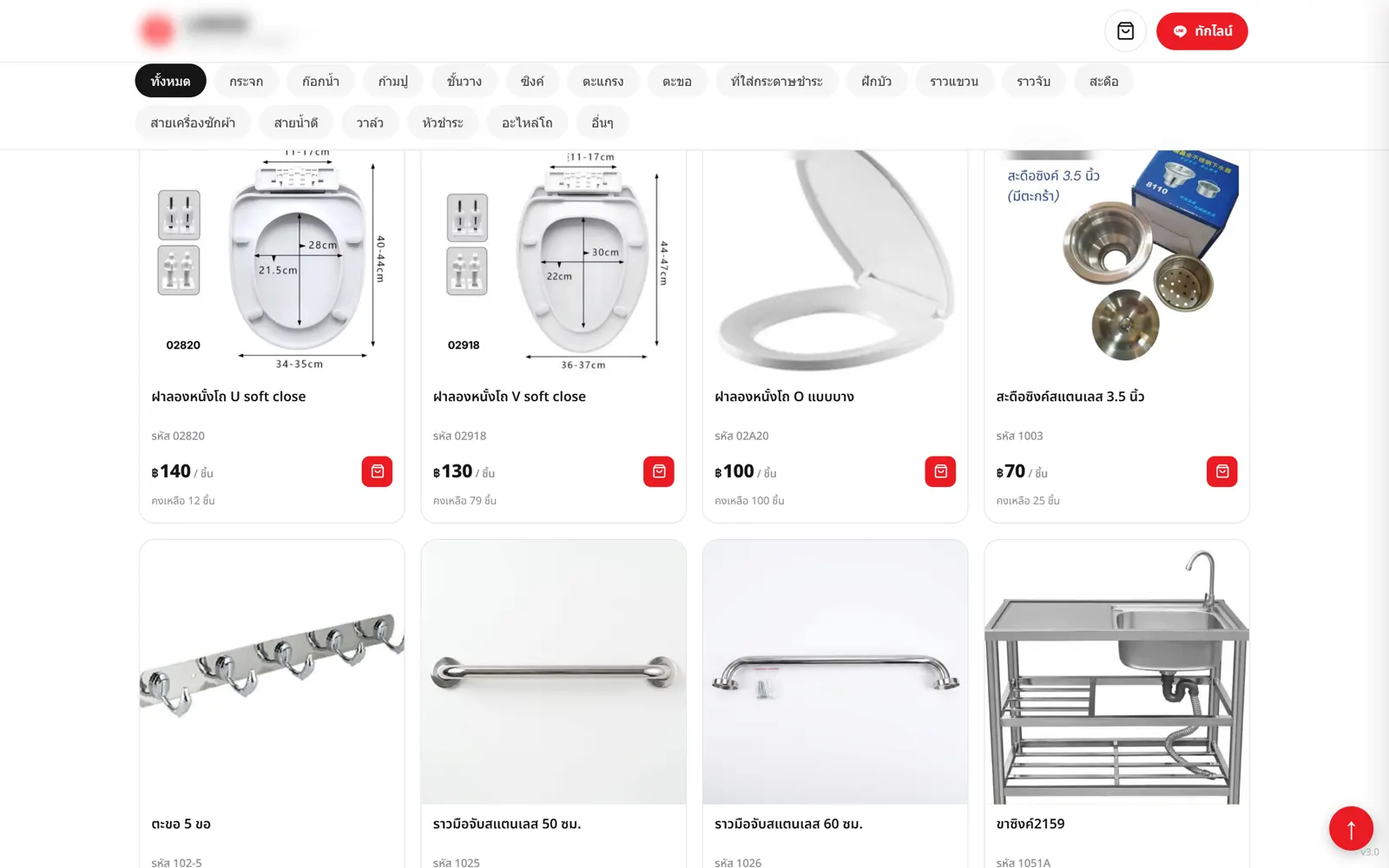
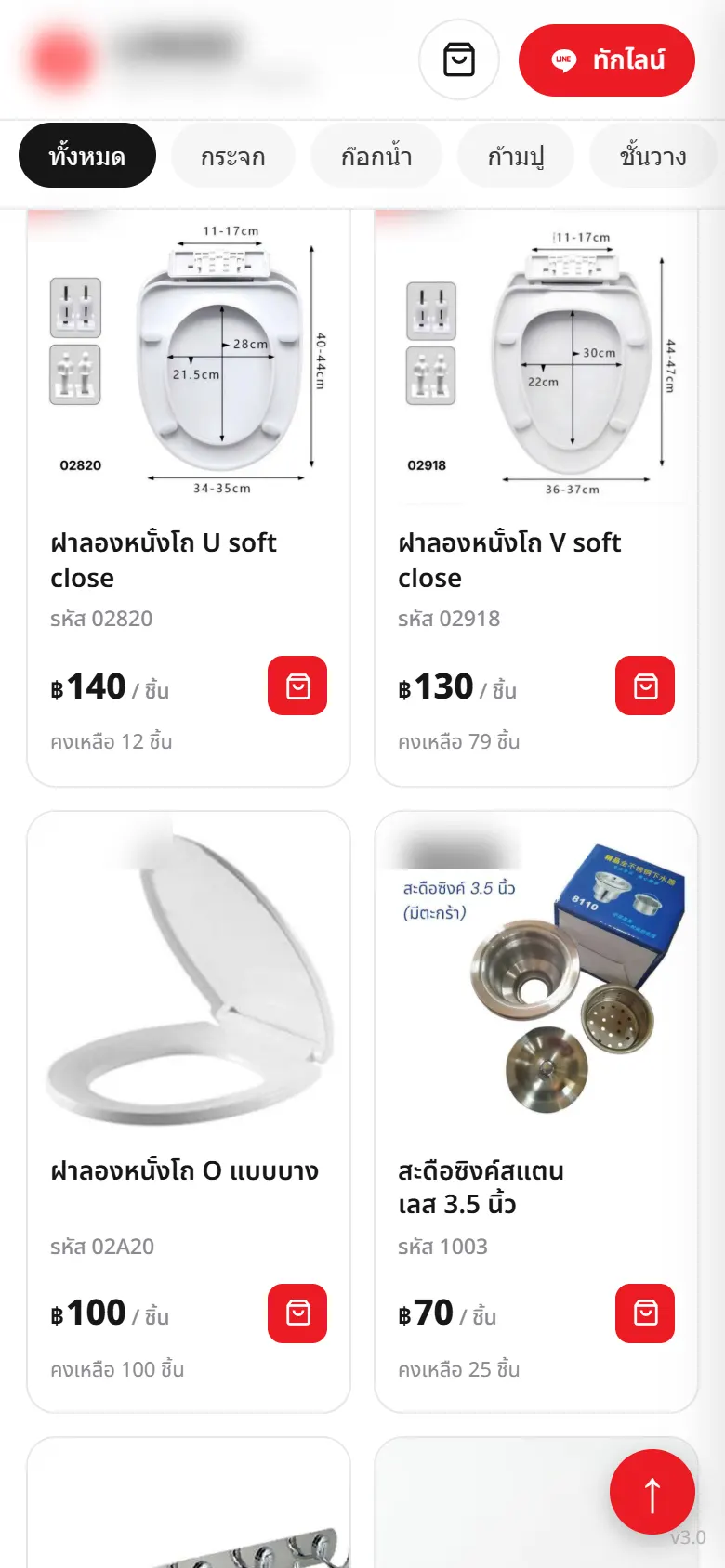
เว็บแคตตาล็อกสาธารณะที่แบ่งตามหมวดสินค้าจริงจาก ERP มีรูปสินค้า ราคา และสต็อกที่อัปเดตอัตโนมัติ ลูกค้าค้นหาได้ ใส่ตะกร้าแล้วส่งฟอร์มสอบถามที่จะเด้งเข้าอีเมลทันที หลังบ้านให้เจ้าของแก้ราคาและรายละเอียดสินค้าเองได้ ทำ SEO ติด Google Analytics 4 และยืนยันเว็บกับ Search Console แล้ว
A public catalog organized by the ERP's real product categories, with photos, prices and automatically updated stock. Customers search, add to a cart and send an inquiry that lands in email instantly. An admin side lets the owner edit prices and details. SEO, Google Analytics 4 and Search Console are set up.
ผลResult
เปิดใช้งานจริงแล้ว มีสินค้า 322 รายการ ใน 18 หมวด สต็อกอัปเดตเองทุก 5 นาที ไม่มีใครต้องกรอกซ้ำ ลูกค้าส่งรายการสินค้ามาเป็นชุดผ่านฟอร์มได้เลย
Live, with 322 products in 18 categories and stock refreshed every 5 minutes with no manual entry. Customers send whole item lists through the form.
ทีมการตลาดเอาไปใช้ยังไงHow a marketing team would use it
ทำ landing page โปรโมชันที่ดึงข้อมูลจริง (เงื่อนไข โควตาที่เหลือ) มาโชว์อัตโนมัติ ติด tracking วัด funnel ได้ตั้งแต่วันแรก และส่ง lead จากฟอร์มเข้าระบบติดตามโดยไม่ต้องคัดลอกเอง
Promotion landing pages that pull live data (terms, remaining quota) automatically, funnel tracking from day one, and form leads routed straight into follow-up without copy-paste.
06
เครื่องมือทำรายงานผลการเทรด
Trade review reporting tool
เปลี่ยนตารางประวัติการเทรดให้เป็นภาพบนกราฟ พร้อมรายงานวินัยการเทรด
Turns a table of past trades into a chart view plus a trading-discipline report
ปัญหาProblem
ประวัติการเทรดในโปรแกรมเป็นแค่ตารางตัวเลข ไม่เห็นว่าเข้าออกตรงไหนของกราฟ ทบทวนตัวเองยาก และไม่รู้ว่าพลาดเพราะระบบหรือเพราะวินัย
Trade history in the trading platform is just a table. You cannot see where entries and exits sat on the chart, so it is hard to tell whether a loss came from the strategy or from discipline.
สร้างอะไรWhat I built
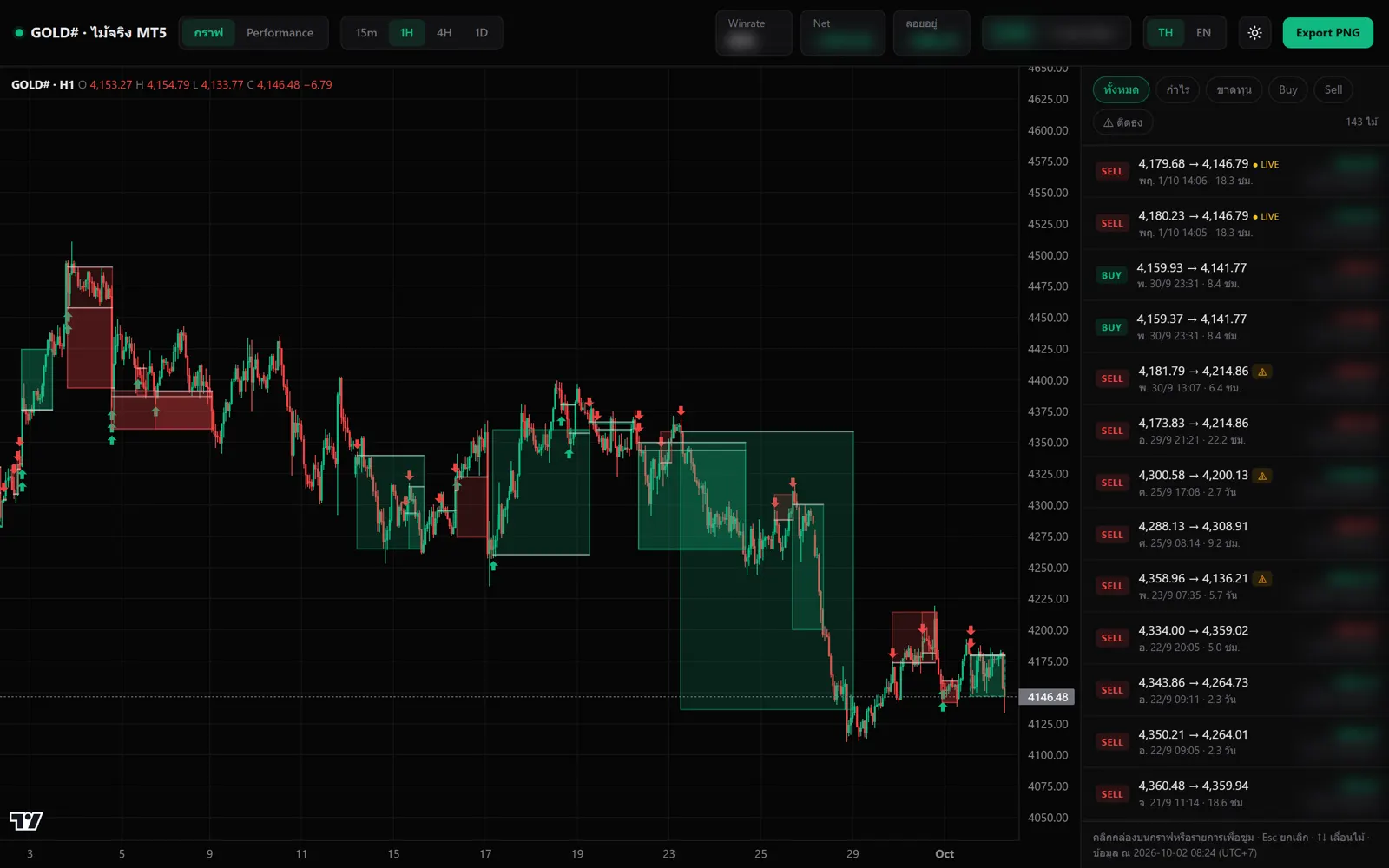
ดึงประวัติการเทรดจาก MetaTrader 5 มาวาดเป็นกล่องบนกราฟแท่งเทียนแบบเดียวกับ TradingView มีหน้ารายงาน: เส้นผลตอบแทนสะสม สรุปรายเดือน ปฏิทินรายวัน "กำไรที่ทิ้งไว้บนโต๊ะ" (ราคาเคยไปถึงไหนเทียบกับจุดที่ปิดจริง) เช็ควินัย (ขนาดไม้เกินที่ตั้งไว้) และแยกผลตาม session วัน และระยะเวลาถือ Export เป็นภาพได้ เลือกได้ทั้งไทยและอังกฤษ ธีมมืดและสว่าง
Pulls trade history from MetaTrader 5 and draws each trade as a box on a candlestick chart, TradingView-style. Report pages: cumulative return curve, monthly summary, daily calendar, "profit left on the table" (how far price went vs. where the trade was closed), a discipline check (position size above the set limit) and breakdowns by session, weekday and holding time. PNG export, Thai/English, light/dark.
ผลResult
ผมใช้ทบทวนการเทรดของตัวเองเป็นประจำ เปิดจากไอคอนบนเดสก์ท็อปคลิกเดียว
I use it regularly to review my own trading; it opens from a single desktop icon.
ทีมการตลาดเอาไปใช้ยังไงHow a marketing team would use it
ทำเนื้อหาให้ความรู้เรื่องการบริหารความเสี่ยงที่อิงพฤติกรรมจริงของผู้ใช้ และทำ "สรุปพอร์ตรายเดือน" ให้ผู้ใช้แชร์ลงโซเชียลได้เอง (แบบ Spotify Wrapped) โดยโชว์แค่วินัยและสถิติการใช้งาน ไม่โชว์กำไร เพื่อเป็น viral loop ที่ไม่ขัดเกณฑ์โฆษณา
Risk-management education based on users' real behavior, and a shareable "monthly recap" (Spotify Wrapped-style) that shows discipline and usage stats, not profits, as a viral loop that stays within advertising rules.